

系列專欄:從 AWS 視角征服 Azure:AZ-900 30 天通關實戰
難度指數:★☆☆☆☆
核心考點:Azure Portal, Azure CLI, Azure PowerShell, Azure Cloud Shell, Azure Mobile App, ARM (Azure Resource Manager) 統一管理平面, 跨平台支援性(Windows / macOS / Linux / 瀏覽器)
本日 使用了aws kiro-cli(模型為opus 5) 補充gemini.md 偷懶的部分制定了更嚴謹的 寫作規範及 參考順序。
詳見gist https://gist.githubusercontent.com/linjinhsien/7f4792b2f40bfe79e427b37c4524ea7c/raw/39219723d927b0a5c6b9894f2e1b0d06cc259371/gistfile1.txt ,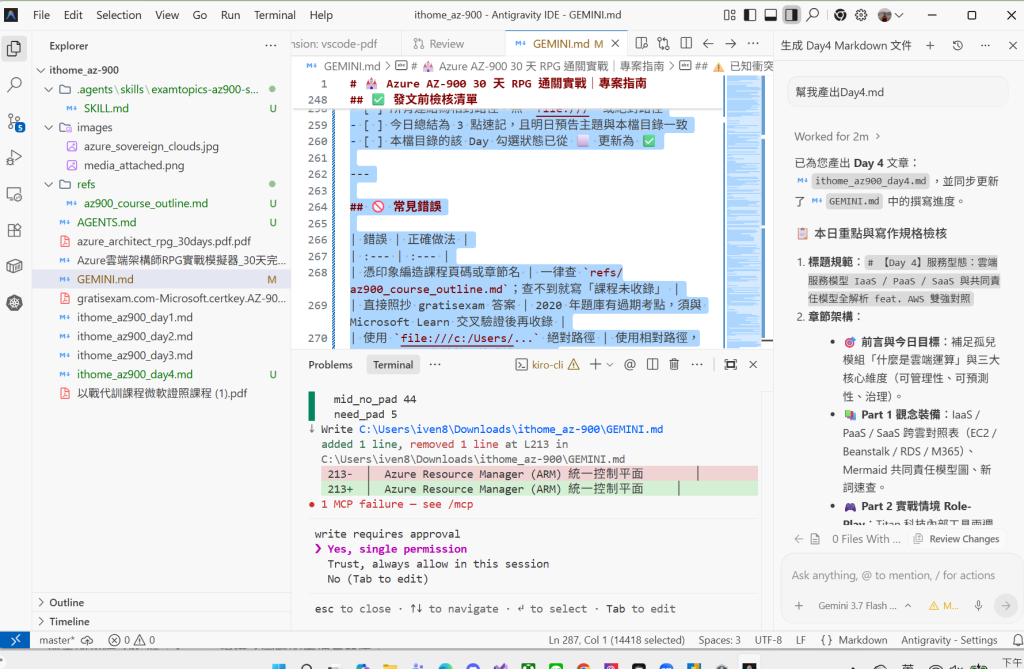
在經歷了 Day 1 的邏輯資源階層、Day 2 的全球實體架構與 Day 3 的主權合規雲之後,我們已經全面掌握了 Azure 的版圖邊界。
但作為一名雲端架構師或 DevOps 工程師,日常工作中不可或缺的一環就是:「我們到底該拿什麼武器去操控 Azure 資源?」
當你想手動探索功能、撰寫跨平台 CI/CD 自動化腳本、利用 PowerShell 模組批次維運,或者在外出用餐時用手機重啟故障 VM 時,Azure 提供了完整的管理兵器庫。
今日 Day 4 的核心任務,就是要帶你全面拆解 Azure Portal、Azure CLI、Azure PowerShell、Azure Cloud Shell 與 Azure Mobile App 的選型情境與跨平台支援度,並揭開微軟雲端架構最迷人的底層設計——Azure Resource Manager (ARM) 統一管理平面!
許多從 AWS 轉換到 Azure 的工程師常有一個盲點:「在 Azure Portal 上建的虛擬機器,用 Azure CLI 看得到嗎?權限會不會不一樣?」
答案是:100% 看得到,而且行為完全一致!
因為不論你點擊網頁、敲下指令碼還是執行 SDK,所有請求最終都會發送給同一個核心大腦——ARM API。
| 管理工具類別 | AWS 對應工具 | Azure 對應工具 | 運作環境與跨平台支援 | 核心特色與最佳適用情境 | AZ-900 關鍵考點 |
|---|---|---|---|---|---|
| 圖形化網頁介面 | AWS Management Console | Azure Portal | 任何支援現代瀏覽器的設備(Chrome, Edge, Safari, Firefox) | • 圖形化 GUI 介面,最適合初學者探索、可視化監控與手動調整。• 具備全球資料中心高可用韌性與零停機持續更新。• 支援自訂儀表板 (Custom Dashboards) 與全域搜尋。 | • 不適合大規模重複性部署或自動化任務。• 全球韌性:在所有 Azure 資料中心皆有部署節點。 |
| 跨平台命令列 | AWS CLI | Azure CLI | 可安裝於 Windows、macOS、Linux(支援 Docker 容器) | • 跨平台命令列工具,指令皆以 az 開頭(如 az vm create)。• 輸出預設為 JSON,易於與 Bash / Linux 腳本與 CI/CD 管線整合。 |
• 跨平台:可在 macOS 與 Linux 終端機直接執行。• Windows 執行環境(高頻考點):可在 Command Prompt (CMD) 與 Windows PowerShell 兩者直接執行。 |
| Cmdlet 指令碼模組 | AWS Tools for PowerShell | Azure PowerShell (Az 模組) |
可安裝於 Windows、macOS、Linux(需 PowerShell Core 6+ / 7+) | • 以 PowerShell Cmdlet 為基礎,採用「動詞-名詞」語法(如 New-AzVM, Get-AzResourceGroup)。• 物件導向輸出,最適合熟悉 Windows / .NET 生態系的維運工程師。 |
• 跨平台:過去僅限 Windows,現在透過 PowerShell Core 亦可跑在 Linux/macOS 上。 |
| 瀏覽器內建終端機 | AWS CloudShell | Azure Cloud Shell | 免安裝!直接在瀏覽器(或 Portal、VS Code、手機 App)中開啟 | • 預先認證 (Pre-authenticated):登入即自動帶入當前 Azure 帳號身分。• 雙核心環境:可自由切換 Bash(預載 Azure CLI)或 PowerShell(預載 Azure PowerShell)。• 需掛載一個 Azure Storage Account (Files) 以持久化保存 $HOME 目錄檔案。 |
• 免安裝任何軟體。• 第一次啟動時必須關聯一個儲存體帳戶。 |
| 行動端 App | AWS Console Mobile App | Azure Mobile App | iOS / Android 行動裝置 | • 提供即時告警通知、健康狀況檢視。• 可執行基本的緊急維運操作(如重啟 VM、停止 Web App),並內建 Cloud Shell 終端。 | • 適合下班或通勤時的緊急突發故障排除,不適合做複雜建置。 |
微軟官方文件(什麼是 Azure 入口網站?)將 Azure Portal 定位為「以 Web 為基礎的統一主控台」,也是企業架構師手動組建、管理與監視雲端環境的第一站。
┌────────────────────────────────────────────────────────────────────────┐
│  Azure Portal (portal.azure.com) 全域架構與介面版面導覽                │
├────────────────────────────────────────────────────────────────────────┤
│ [常駐頁面標頭]                                                         │
│  [功能表]    [全域搜尋資源、服務、文件]    [Cloud Shell] [通知] [帳戶] │
├─────────────────┬──────────────────────────────────────────────────────┤
│ 入口網站功能表  │ 常用主工作區:首頁 (Home) / 自訂儀表板 (Dashboard)   │
│ (Portal Menu)   ├──────────────────────────────────────────────────────┤
│ • + 建立資源    │ 階層路徑 (Breadcrumb):訂用帳戶 > 資源群組 > 資源    │
│ • 我的最愛      ├──────────────────────────┬───────────────────────────┤
│ • 所有服務      │ 服務功能表 (Service Menu)│ 資源工作窗格 (Work Pane)  │
│ ────────────────│ • 概觀 (Overview)        │ • 運行狀態與指標圖表      │
│ 顯示模式切換:  │ • 活動記錄 (Activity log)│ • 磁磚釘選 (Pin to Dash)  │
│ ▷ 飛出 (Flyout) │ • 存取控制 (IAM / RBAC)  │ • 網路、大小、磁碟設定    │
│ ▷ 停駐 (Docked) │ • ★ 我的最愛 (自訂置頂)  │ • 診斷與問題疑難排解      │
└─────────────────┴──────────────────────────┴───────────────────────────┘
根據官方文件規範,Azure Portal 的使用者介面由以下核心控制項構成:
首頁 > 資源群組 > 虛擬機器),方便快速返回上一層。不論是開發者在 Visual Studio 呼叫 REST API、維運工程師用 Azure CLI 執行腳本,還是架構師在 Portal 點擊按鈕,背後的呼叫路徑如下:
┌────────────────────────────────────────────────────────────────────────┐
│                   各式客戶端管理工具 (Management Clients)              │
│  ┌──────────────┐  ┌──────────────┐  ┌──────────────┐  ┌──────────────┐│
│  │ Azure Portal │  │  Azure CLI   │  │  Azure PS    │  │ Cloud Shell  ││
│  │  (GUI 網頁)  │  │(Bash/跨平台) │  │ (`Az` 模組)  │  │(免安裝瀏覽器)││
│  └──────┬───────┘  └──────┬───────┘  └──────┬───────┘  └──────┬───────┘│
│         │                 │                 │                 │        │
│         │   ┌─────────────┴─────────────────┴─────────────┐   │        │
│         └──►│        HTTPS REST API / SDK 統一請求        │◄──┘        │
│             └──────────────────────┬──────────────────────┘            │
├────────────────────────────────────┴───────────────────────────────────┤
│              Azure Resource Manager (ARM) 統一控制平面                 │
│  • 統一身分驗證 (Entra ID)             • 統一角色權限 (Azure RBAC)     │
│  • 統一套用合規 (Azure Policy)         • 統一資源防護 (Resource Locks) │
│  • 全局操作稽核 (Activity Log)         • 統一架構搜尋 (Resource Graph) │
├────────────────────────────────────────────────────────────────────────┤
│                     後端核心資源提供者 (Resource Providers)            │
│  ┌──────────────────┐    ┌──────────────────┐    ┌──────────────────┐  │
│  │Microsoft.Compute │    │Microsoft.Network │    │Microsoft.Storage │  │
│  │ • VMs / VMSS     │    │ • VNets/Subnets  │    │ • Storage Accts  │  │
│  │ • App Services   │    │ • NSG / Pub IPs  │    │ • Blob / Files   │  │
│  └──────────────────┘    └──────────────────┘    └──────────────────┘  │
└────────────────────────────────────────────────────────────────────────┘
💡 架構師必備心法(ARM 統一性的三大好處):
- 結果一致性:用 Portal 建立的資源,跟用 CLI、PowerShell 或 ARM Template 建立的完全沒有差別。
- 安全與審計一致性:所有請求都會被 Microsoft Entra ID 驗證身分,並被 Azure RBAC 檢查權限,最後寫入 Azure Activity Log(活動記錄)。
- 鎖定與原則全面生效:只要你在 ARM 層級上了「資源鎖 (Resource Lock)」或「合規原則 (Policy)」,不論任何人用哪種工具都無法繞過!
portal.azure.com)。az [group] [subgroup] [action] [parameters]。Az module)形式提供的管理工具,使用 Cmdlet(動詞-名詞,如 New-AzResourceGroup)操作 Azure。Titan 科技的雲端架構逐步成形,但在每週的跨部門工程會議上,開發與維運主管們為了「管理工具」吵成一團:
Linux 維運工程師:「我們團隊平常都在 Ubuntu 環境開發,每天要跑數十個 Bash 自動化腳本來部屬微服務,我們不想用 Windows 工具!」
Mac 前端工程師:「我用 MacBook Pro,有時候需要快速跑指令驗證 API,但我的電腦容量不夠,不想裝一大堆龐大的本機軟體!」
Windows 自動化管理員:「我們公司過去幾年累積了數千行以 Cmdlet 物件導向為主的 PowerShell 腳本,我們希望能繼續沿用現有維運資產!」
CTO 轉頭問你:「架構師,我們公司有 Windows、macOS、Linux 各種環境,還有跨平台的 CI/CD 自動化管線需求。微軟的工具鏈能不能同時滿足所有人?在 CI/CD 跨平台自動化腳本中,你推薦最標準的工具是什麼?」
Az 模組) 在 Windows/Linux/macOS 上無縫執行現有腳本。jq 解析,是現代 CI/CD 跨平台自動化腳本的業界黃金標準。Az 模組):自 PowerShell Core (6+/7+) 起已全面跨平台,Windows 維運人員既能沿用熟悉的 Cmdlet 物件導向管線,又能在 Linux 伺服器或容器內執行。AzureRM 模組確實緊密綁定 Windows PowerShell,但現代的 Az 模組早已全面支援 Linux 與 macOS。以下精選 7 題(4 題 ExamTopics 高頻題 + 3 題 gratisexam 題庫題)進行原廠級架構師深度推理拆解:
【Question】 (選自 AZ-900 官方考古題真題 Question 42)
For each of the following statements, select Yes if the statement is true. Otherwise, select No.
| 題目陳述 (Statements) | Yes / No |
|---|---|
| 1. Azure CLI can be installed on computers that run Windows, macOS, and Linux. | [ ? ] |
| 2. Azure PowerShell can be used from computers that run Linux and macOS. | [ ? ] |
| 3. Azure Portal can be accessed from a tablet or Chromebook that has a web browser. | [ ? ] |
正確答案:
架構師思維推理鏈:
Azure CLI、Azure PowerShell、Azure Portal、Windows, macOS, and Linux、tablet or Chromebook with browser。Az 模組發布後,Azure PowerShell 已經可在 macOS 與 Linux 上原生運作。故選 Yes。來源與驗證:改寫自 ExamTopics 社群回報的高頻考點(AZ-900 Q42),經 Microsoft Learn:Azure CLI 安裝指南 與 Azure PowerShell 安裝指南 交叉驗證確認。
【Question】 (選自 AZ-900 考古題真題 Question 88)
You plan to use Azure Cloud Shell to manage Azure resources.
What is required when you use Azure Cloud Shell for the first time?
正確答案:B
架構師思維推理鏈:
Azure Cloud Shell、for the first time、required。$HOME 目錄(包含個人檔案、腳本程式碼、.bashrc 設定檔與 Git 金鑰),它背後必須依賴一個持久儲存媒介。來源與驗證:改寫自 ExamTopics 社群回報的高頻考點(AZ-900 Q88),經 Microsoft Learn:Azure Cloud Shell 概觀 交叉驗證確認。
【Question】 (選自 AZ-900 官方題庫真題 Question 25 / ExamTopics 高頻題)
A support engineer plans to perform several Azure management tasks by using the Azure CLI.
You install the CLI on a computer that runs Windows.
You need to tell the support engineer which tools to use to run the CLI.
Which two tools should you instruct the support engineer to use? Each correct answer presents a complete solution.
(NOTE: Each correct selection is worth one point.)
正確答案:A、C
架構師思維推理鏈:
Azure CLI、install the CLI on a computer (Windows)、which two tools to run the CLI。az 指令的終端 Shell 環境。az.cmd)。任何 Command-Line Shell(包含 CMD 與 PowerShell)都能原生呼叫外部可執行檔!New-AzVM)只能在 PowerShell 環境直譯,無法在 Command Prompt 裡直接執行 ❌az 即可順利執行。az 命令可無縫運作,是標準的執行工具之一。來源與驗證:改寫自 AZ-900 官方題庫真題 Q25 / ExamTopics 高頻題,經 Microsoft Learn:在 Windows 上安裝 Azure CLI 交叉驗證確認。
【Question】 (選自 AZ-900 官方題庫精選)
Review the underlined text. If it makes the statement correct, select "No change is needed". If the statement is incorrect, select the answer choice that makes the statement correct.
Azure CLI, Azure PowerShell, and the Azure Portal all send requests to Azure Resource Manager (ARM) to manage resources.
正確答案:A (No change is needed)
架構師思維推理鏈:
Azure CLI、Azure PowerShell、Azure Portal、send requests to ARM。來源與驗證:改寫自 AZ-900 高頻考點(ARM 統一控制平面),經 Microsoft Learn:Azure Resource Manager 概觀 交叉驗證確認。
⚠️ 來源說明:本題改寫自 2020 年 gratisexam AZ-900 題庫(Q31),屬歷史題庫層,已與 Microsoft Learn 交叉驗證,考點至今仍然有效。
【Question】
系統管理員要跑一支 PowerShell 腳本來建立 Azure 資源,需選擇合適的電腦環境。
解法:從一台執行 macOS 且已安裝 PowerShell Core 6.0 的電腦執行該腳本。這個解法可行嗎?
正確答案:A (Yes)
架構師思維推理鏈:
PowerShell script、macOS、PowerShell Core 6.0、Solution: Run script from macOS with PowerShell Core。Az 模組後,即可完整調用 Cmdlet 腳本來操作 ARM API 建立 Azure 資源,因此該方案完全可行。.ps1 的 PowerShell 腳本」,答案就會逆轉為 No——因為 Azure CLI 的 az 命令列工具無法原生直譯 PowerShell 專屬語法與 Cmdlet 物件管線。來源與驗證:改寫自 2020 年 gratisexam 題庫 Q31,經 Microsoft Learn:在 macOS 安裝 Azure PowerShell 交叉驗證確認。
⚠️ 來源說明:本題改寫自 2020 年 gratisexam AZ-900 題庫(Q52),屬歷史題庫層,已與 Microsoft Learn 交叉驗證,考點至今仍然有效。
【Question】
你需要從一台執行 Android 作業系統的平板建立一台新的 Azure 虛擬機器。
解法:使用 Azure Cloud Shell 中的 PowerShell。這個解法可行嗎?
正確答案:A (Yes)
架構師思維推理鏈:
Android operating system tablet、create Azure VM、Solution: Azure Cloud Shell with PowerShell。shell.azure.com 或 Azure Portal,即可進入預先認證的 PowerShell 環境,使用 New-AzVM 指令順利建立 VM,故解法完全有效。來源與驗證:改寫自 2020 年 gratisexam 題庫 Q52,經 Microsoft Learn:Azure Cloud Shell 功能特性 交叉驗證確認。
⚠️ 來源說明:本題改寫自 2020 年 gratisexam AZ-900 題庫(Q41),屬歷史題庫層,已與 Microsoft Learn 交叉驗證,考點至今仍然有效。
【Question】
公司部署了一個 Azure Web App,系統維運主管外出時需要**從一台 iPhone(或僅有現代瀏覽器的行動裝置)**調整該 Web App 的組態設定。
請問主管可以使用哪 兩 種 Azure 管理工具?(每選對一項得 1 分)
正確答案:B、C
架構師思維推理鏈:
manage settings of web app、from an iPhone / browser、two Azure management tools。portal.azure.com 頂部圖示或直接造訪 shell.azure.com 開啟),在 iPhone 瀏覽器中同樣可直接開啟並執行管理指令。來源與驗證:改寫自 2020 年 gratisexam 題庫 Q41,經 Microsoft Learn:Azure Cloud Shell 概觀 與 Azure 入口網站概觀 交叉驗證確認。
在 AZ-900 考場中,關於「管理工具與存取通道(Management Tools)」的考題型態非常豐富。為了幫助你在實戰中迅速識破題型套路,以下整理出原廠 6 大核心出題題種與對應破解心法:
az vm create --resource-group RG1 ...),連續出 3~4 小題不同方案,詢問能否達成目標(Does this meet the goal?):
az 命令 ➔ Yes(PowerShell 亦可呼叫 az 執行檔)。az 指令 ➔ No(沒裝 CLI 找不到指令)。code .(Monaco 編輯器)。| 項目 | 內容 |
|---|---|
| 對應課程章節 | 第 3 章 Azure 管理與治理 ▸ 管理 Azure 的入口(p117) |
| 官方考綱領域 | Describe Azure Management & Governance(占比 30–35%) |
| 課程涵蓋範圍 | 介紹 Azure Portal、Azure Cloud Shell、Azure CLI 與 Azure PowerShell 四大工具的基本定義、操作型態(GUI vs CLI vs Scripting)與 Cloud Shell 的快速上手。 |
| 本文補充範圍 | 1. 深度補充微軟官方文件(azure-portal-overview)所規範的 Azure Portal 全球高可用架構(全資料中心節點佈署/容錯韌性/零停機維護)、常駐頁面標頭控制項、雙重選單機制(入口功能表飛出/停駐模式 vs 服務功能表星號收藏/會話記憶) 與自訂共用儀表板 (Shared Dashboards) 協同管理。2. 深度剖析 Azure CLI 在 Windows 終端執行環境(Command Prompt 與 Windows PowerShell 雙支援) 與單向相容原則(CLI 可進 PowerShell,Cmdlet 不可進 CMD)。3. 深度剖析 純瀏覽器與行動環境的管理工具選型(Azure Portal 與 Azure Cloud Shell 雙解法,無本機安裝依賴)。4. 深入剖析 ARM (Azure Resource Manager) 統一控制平面的架構圖與 API 轉發流程、跨平台作業系統支援矩陣(Windows/macOS/Linux/Chromebook)、Azure Mobile App 行動端定位、Cloud Shell 需綁定 Storage Account 的底層機制,以及與 AWS 對應工具(Console / AWS CLI / CloudShell / Tools for PowerShell)的深度對照。5. 系統化彙整 AZ-900 管理工具 6 大核心出題題種全景矩陣(多選/拖曳配對/情境題組/熱點是非/底線評估/功能邊界) 與高頻破解心法。 |
學會了用命令列與 Portal 操控 Azure,但如果我們要一鍵部署包含 100 台 VM、VNet 與負載平衡器的整套複雜生產環境,總不能一條條指令手敲吧?
明天 Day 5,我們將正式踏入現代雲端工程師的核心武器庫——【ARM Templates & Bicep】!我們將探索 Infrastructure as Code (IaC) 的精髓,並與 AWS CloudFormation 進行深度對照!
(如果你覺得這篇教學對你的 Azure / AWS 雙雲學習與證照備考有幫助,歡迎分享給身邊的雲端戰友!)


 iThome鐵人賽
 看影片追技術